پلاک اینورتر چیست؟ آموزش پلاکخوانی و معنی مشخصات درایو

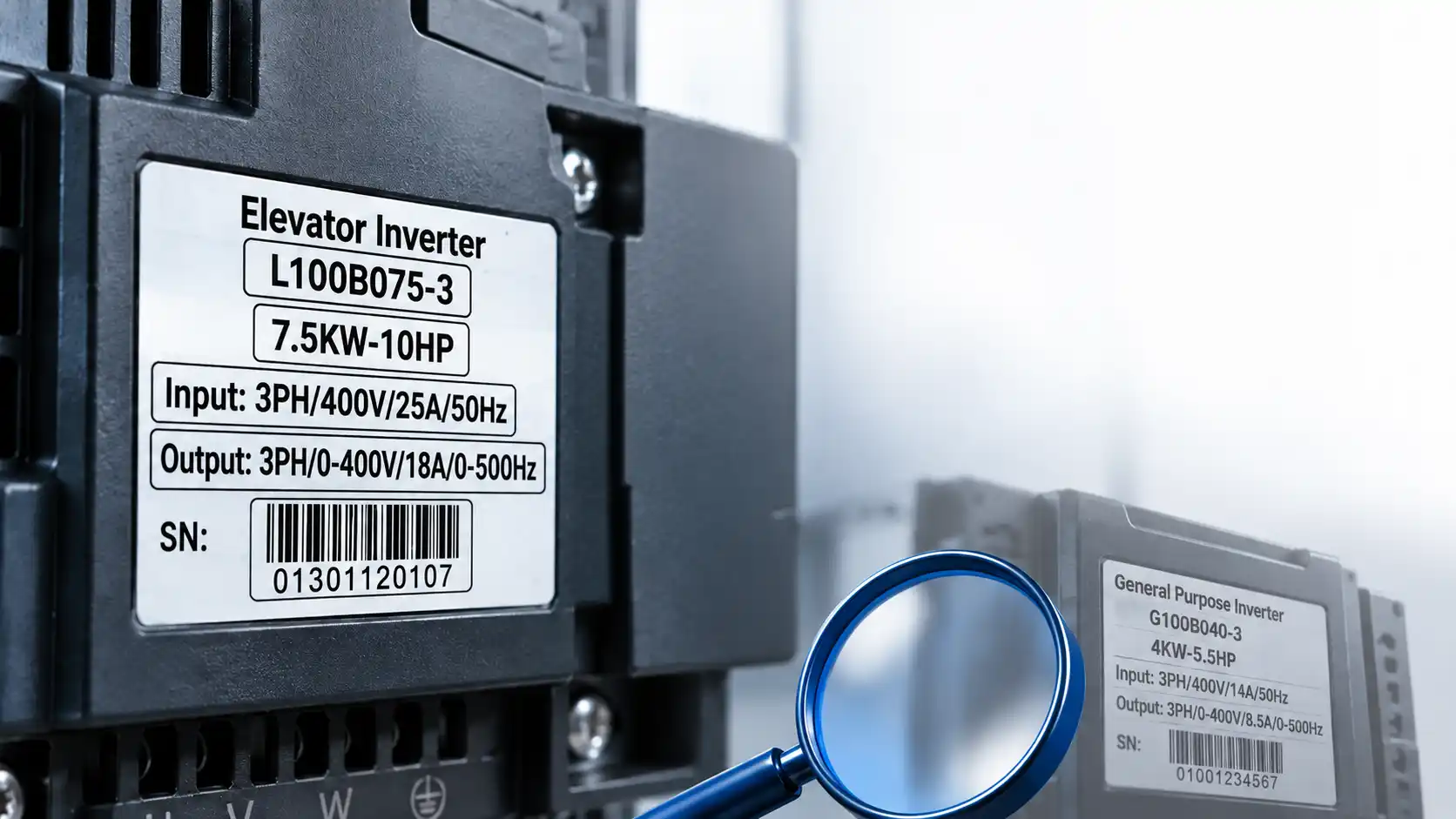
پلاک اینورتر چیست و چطور اطلاعات روی پلاک یک درایو را بخوانیم؟
۱۴ آمپر یا ۸٫۵ آمپر؛ کدامیک جریان اینورتر است؟ جالب است بدانید هر دو عدد میتوانند روی پلاک یک دستگاه نوشته شده باشند، اما معنی یکسانی ندارند. یکی به ورودی مربوط است و دیگری به خروجی؛ تفاوتی که اگر به آن توجه نکنید، ممکن است مشخصات درایو را اشتباه بخوانید.
پلاک اینورتر اطلاعات مهمی را در چند ردیف کوتاه نشان میدهد، اما برای خواندن درست آن باید بدانید هر عدد، علامت و کد دقیقاً به چه معناست. از توان و جریان گرفته تا فرکانس، مدل دستگاه و شماره سریال، هر بخش اطلاعات مشخصی در اختیار شما میگذارد.
در این آموزش،سراغ دو پلاک واقعی از درایوهای صنعتی و آسانسوری میرویم و قدمبهقدم معنی اعداد و کدهای روی آنها را بررسی میکنیم.
پلاک اینورتر چه اطلاعاتی به ما میدهد؟
برای شناخت مشخصات یک درایو فرکانسمتغیر، پلاک دستگاه یکی از مهمترین بخشهایی است که باید خوانده شود. اما نکته اینجاست که تنها دانستن معنی اعداد کافی نیست؛ محل قرارگیری آنها هم اهمیت دارد.
برای مثال، اگر روی پلاک دو عدد با واحد آمپر ببینید، از کجا متوجه میشوید کدامیک جریان ورودی و کدام جریان خروجی است؟
پاسخ در عنوان ردیفهاست. در نمونههایی که بررسی میکنیم، اطلاعات به پنج بخش اصلی تقسیم شدهاند:
- مدل (Model): کد شناسایی درایو که اطلاعاتی درباره نوع، سایز و توان آن دارد.
- توان (Power): توان درجشده روی پلاک با واحد کیلووات (kW) و اسب بخار (HP).
- ورودی (Input): مشخصات برق ورودی، شامل تعداد فاز، ولتاژ، جریان و فرکانس.
- خروجی (Output): اطلاعات خروجی درایو، شامل فاز، ولتاژ، جریان و فرکانس.
- شماره سریال (SN): شناسه مجزای دستگاه که در کنار بارکد نمایش داده میشود.
برای یادگیری بهتر، این پنج بخش را روی دو نمونه واقعی بررسی میکنیم تا تفاوت اعداد و علامتها کاملاً روشن شود.
راهنمای سریع پلاکخوانی اینورتر در ۵ مرحله
برای خواندن پلاک اینورترهای زیما، باید اطلاعات مربوط به مدل دستگاه، توان، مشخصات برق ورودی و خروجی و شماره سریال را بررسی کنید. در دفترچههای راهنمای سری G و L زیما، این اطلاعات روی پلاک دستگاه مشخص شدهاند.
۱. مدل اینورتر را شناسایی کنید.
ابتدا کد مدل دستگاه را از روی پلاک بخوانید. برای مثال، در دفترچه سری G مدل G100B040-3 و در دفترچه سری L مدل L100B075-3 نمایش داده شده است.
۲. توان نامی دستگاه را بررسی کنید.
توان اینورتر روی پلاک با واحد کیلووات (kW) و اسب بخار (HP) مشخص میشود. در نمونه سری G، توان دستگاه 4kW-5.5HP و در نمونه سری L، توان 7.5kW-10HP درج شده است.
۳. مشخصات برق ورودی (Input) را بخوانید.
در بخش Input، تعداد فازهای ورودی، ولتاژ، جریان و فرکانس برق ورودی مشخص شده است.
سری G: 3PH/400V/14A/50Hz
سری L: 3PH/400V/25A/50Hz
۴. مشخصات برق خروجی (Output) را بررسی کنید.
در بخش Output، تعداد فازهای خروجی، محدوده ولتاژ، جریان و محدوده فرکانس خروجی درج شده است.
- سری G:
3PH/0-400V/8.5A/0-500Hz - سری L:
3PH/0-400V/18A/0-500Hz
۵. شماره سریال دستگاه را پیدا کنید.
شماره سریال دستگاه نیز روی پلاک مشخص شده است. در نمونههای ارائهشده در دفترچههای سری G و L، شماره سریال در قسمت پایین پلاک و همراه با بارکد نمایش داده شده است.
نکته: مقادیر ذکرشده مربوط به نمونه پلاکهای G100B040-3 و L100B075-3 در دفترچههای راهنمای زیما هستند. مشخصات سایر مدلها باید مطابق پلاک همان دستگاه خوانده شوند.
آموزش کامل پلاکخوانی اینورتر صنعتی G100
برای شروع، پلاک یک درایو صنعتی با مدل G100B040-3 را در نظر بگیرید. بالای پلاک عبارت General Purpose Inverter دیده میشود و در ردیفهای پایینتر، توان و مشخصات الکتریکی دستگاه قرار دارند.
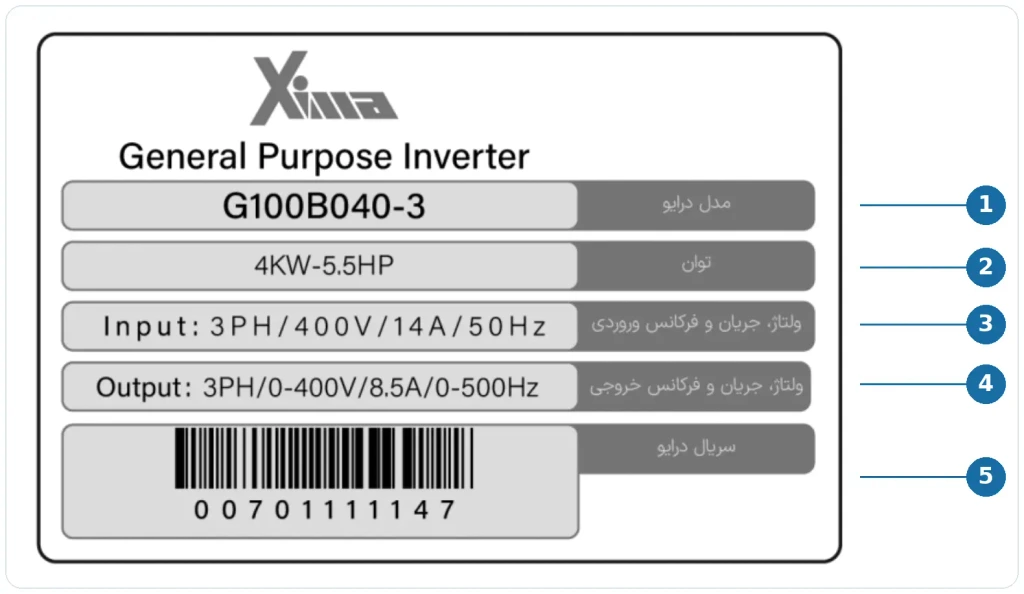
مشخصات درجشده روی پلاک این مدل
| مشخصه | مقدار |
|---|---|
| مدل | G100B040-3 |
| توان | 4KW-5.5HP |
| ورودی | 3PH / 400V / 14A / 50Hz |
| خروجی | 3PH / 0-400V / 8.5A / 0-500Hz |
| شناسه دستگاه | شماره سریال و بارکد |
حالا هر بخش را جداگانه بررسی کنیم.
توان 4KW-5.5HP روی پلاک چه معنایی دارد؟
در ردیف توان، عبارت 4KW-5.5HP نوشته شده است.
KW مخفف کیلووات و HP مخفف اسب بخار است. بنابراین توان این مدل روی پلاک با دو واحد نمایش داده شده: ۴ کیلووات و ۵٫۵ اسب بخار.
نکتهای که باید به آن توجه کنید، تفاوت این عدد با مقادیر جریان است. توان با واحد کیلووات یا اسب بخار نوشته میشود، درحالیکه جریان ورودی و خروجی با واحد آمپر مشخص شدهاند.
از کجا جریان ورودی اینورتر را تشخیص دهیم؟
کافی است ردیف Input را پیدا کنید. برای مدل موردنظر، این ردیف به شکل زیر نوشته شده است:
3PH / 400V / 14A / 50Hz
عبارت 3PH نشان میدهد که ورودی دستگاه سهفاز است. عدد 400V ولتاژ ورودی را مشخص میکند و 14A جریان ورودی درجشده روی این نمونه پلاک است. در انتهای ردیف نیز 50Hz به فرکانس ورودی اشاره دارد.
پس اگر روی این پلاک به دنبال جریان ورودی هستید، عدد ۱۴ آمپر را باید در ردیف Input پیدا کنید، نه در بخش خروجی.
اطلاعات خروجی اینورتر چه تفاوتی دارد؟
در ردیف بعدی، عبارت Output دیده میشود:
3PH / 0-400V / 8.5A / 0-500Hz
این ردیف، مشخصات خروجی دستگاه را نشان میدهد. خروجی سهفاز است، محدوده ولتاژ خروجی از صفر تا ۴۰۰ ولت درج شده و جریان خروجی روی پلاک ۸٫۵ آمپر است.
اما نکته جالبتر، بخش فرکانس است.
در ردیف ورودی، فرکانس 50Hz نوشته شده، درحالیکه در خروجی محدوده 0-500Hz دیده میشود. یعنی برای خواندن مشخصات، نباید این دو عدد را صرفاً به دلیل داشتن واحد هرتز یکسان در نظر بگیرید.
این تفاوت یکی از نکات اصلی در پلاکخوانی درایو است: هر عدد را باید همراه با عنوان ردیفی که در آن قرار گرفته بخوانید.
چطور کد مدل G100B040-3 را بخوانیم؟
تا اینجا توان و مشخصات ورودی و خروجی را شناختیم؛ اما خود کد مدل هم اطلاعاتی در اختیار ما قرار میدهد.
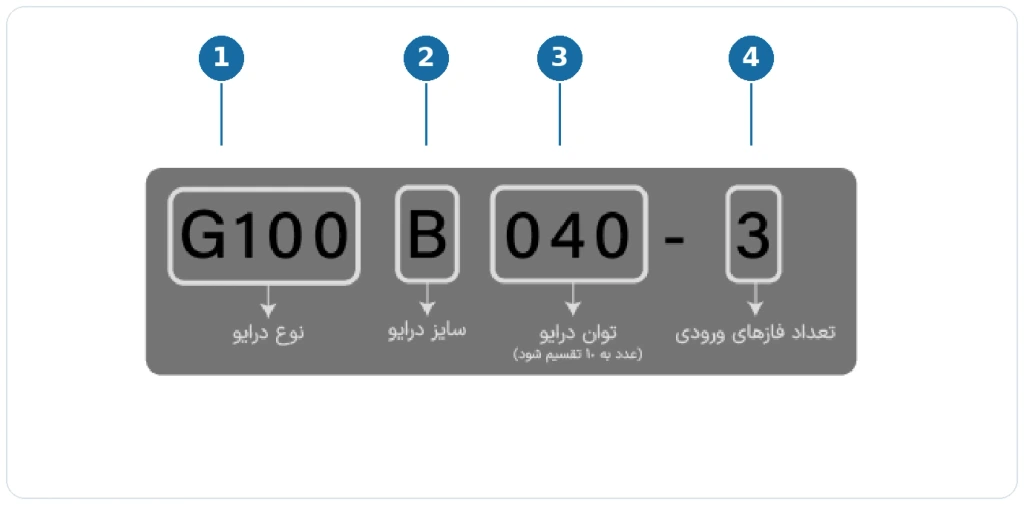
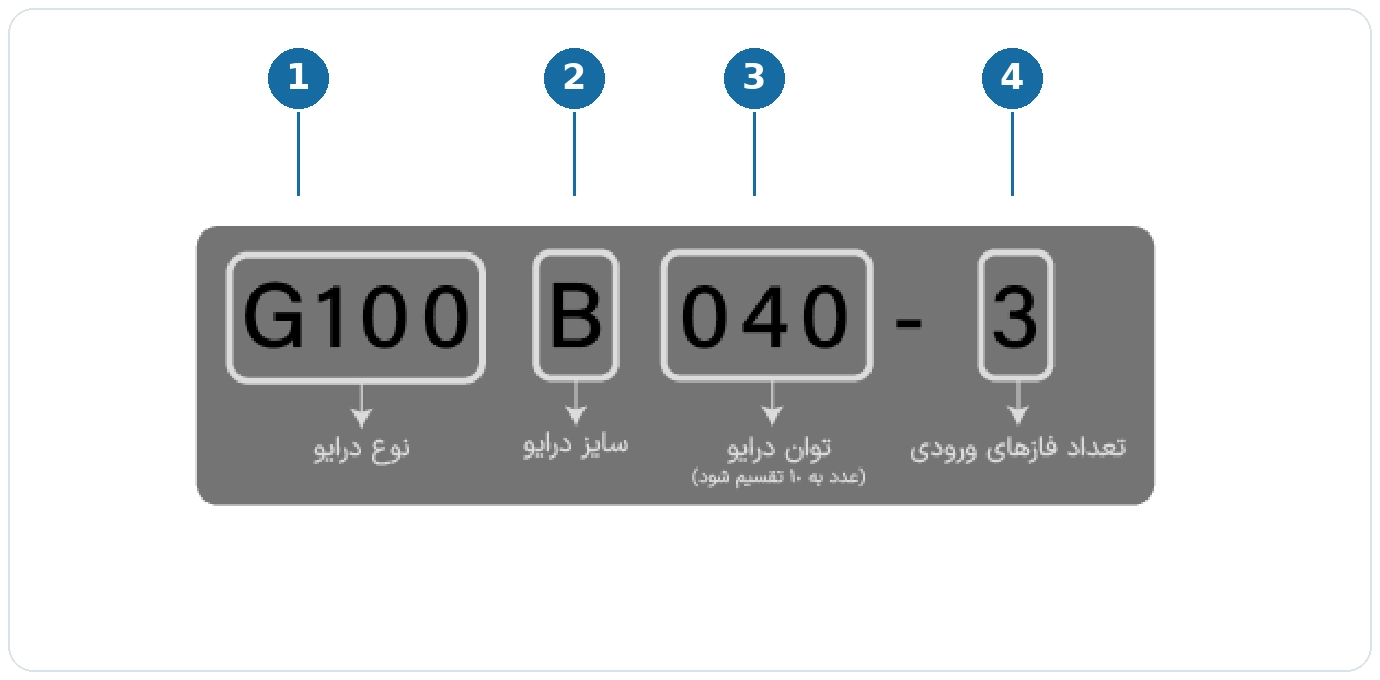
کد G100B040-3 چهار بخش دارد:
G100نوع درایو را مشخص میکند.Bنشاندهنده سایز درایو است.040به توان دستگاه اشاره دارد.3تعداد فازهای ورودی را نشان میدهد.
در این ساختار نامگذاری، برای تشخیص توان باید عدد 040 را بر ۱۰ تقسیم کنیم:
040 ÷ 10 = 4 kW
پس عدد 040 در این مدل به معنی ۴ کیلووات است، نه ۴۰ کیلووات.
این نکته بهویژه هنگام بررسی کد محصول اهمیت دارد؛ زیرا همیشه نمیتوان مقدار توان را مستقیماً از ظاهر عدد تشخیص داد. شیوه کدگذاری باید متناسب با همان خانواده درایو خوانده شود.
آموزش دقیق خواندن پلاک درایو آسانسوری L100
حالا سراغ نمونه دوم برویم؛ درایوی که روی پلاک آن عبارت Elevator Inverter نوشته شده است.
مدل این دستگاه L100B075-3 است و برخلاف مثال قبلی، توان آن ۷٫۵ کیلووات درج شده است.
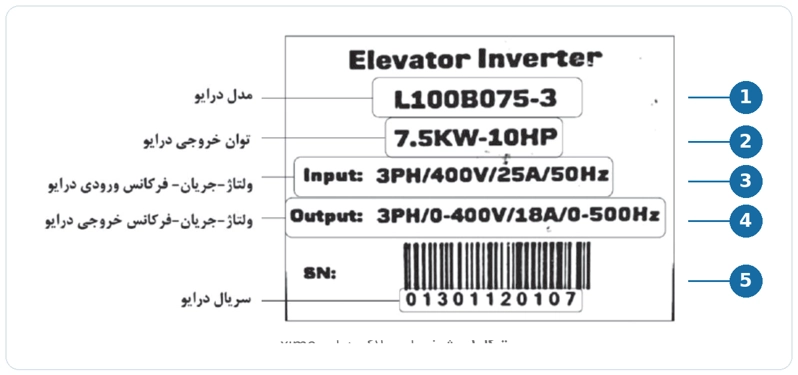
مشخصات این پلاک را ببینید:
| مشخصه | مقدار |
|---|---|
| مدل | L100B075-3 |
| توان | 7.5KW-10HP |
| ورودی | 3PH / 400V / 25A / 50Hz |
| خروجی | 3PH / 0-400V / 18A / 0-500Hz |
| شناسه دستگاه | شماره سریال و بارکد |
با خواندن این جدول میتوانیم چند نکته را متوجه شویم.
اول اینکه ورودی و خروجی هر دو سهفاز هستند. دوم اینکه جریان ورودی روی تصویر پلاک ۲۵ آمپر و جریان خروجی ۱۸ آمپر است. همچنین فرکانس ورودی ۵۰ هرتز و محدوده فرکانس خروجی صفر تا ۵۰۰ هرتز درج شده است.
اگر این اطلاعات را با نمونه صنعتی قبلی مقایسه کنید، متوجه میشوید که با وجود تفاوت توان و جریان، نحوه نمایش بخشهای اصلی پلاک مشابه است.
کد L100B075-3 چه اطلاعاتی دارد؟
ساختار نامگذاری این مدل هم به چهار قسمت تقسیم میشود:
L100 نوع درایو، B سایز، 075 توان و 3 تعداد فازهای ورودی را مشخص میکند.
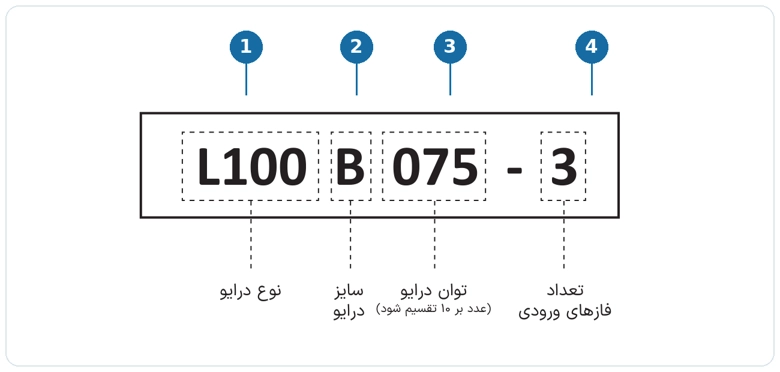
برای محاسبه توان از روی کد، همان روش تقسیم بر ۱۰ به کار میرود:
075 ÷ 10 = 7.5 kW
بنابراین عدد 075 به توان ۷٫۵ کیلووات اشاره دارد.
با مقایسه کدهای G100B040-3 و L100B075-3 میتوان دید که بخش ابتدایی، نوع درایو و بخش عددی مربوط به توان، مقدار توان مدل را در ساختار نامگذاری این دو خانواده مشخص میکند.
تفاوت پلاک اینورتر صنعتی و آسانسوری در یک نگاه
حالا که هر دو نمونه را شناختیم، بهتر است اطلاعات اصلی آنها را کنار هم قرار دهیم.
| مشخصه | مدل G100 | مدل L100 |
|---|---|---|
| کاربرد نمونه | صنعتی | آسانسوری |
| توان | ۴ کیلووات | ۷٫۵ کیلووات |
| جریان ورودی روی پلاک | ۱۴ آمپر | ۲۵ آمپر |
| جریان خروجی روی پلاک | ۸٫۵ آمپر | ۱۸ آمپر |
| فرکانس ورودی | ۵۰ هرتز | ۵۰ هرتز |
| محدوده فرکانس خروجی | ۰ تا ۵۰۰ هرتز | ۰ تا ۵۰۰ هرتز |
نکته مهم این مقایسه آن است که ترتیب نمایش اطلاعات مشابه است، اما مقادیر الکتریکی یکسان نیستند.
بنابراین حتی اگر قبلاً پلاک یک مدل را خوانده باشید، برای شناسایی مشخصات مدل دیگر باید اعداد درجشده روی همان دستگاه را بررسی کنید.
همچنین این مقادیر مربوط به دو تصویر نمونه هستند و نباید به سایر مدلها تعمیم داده شوند.
۴ اشتباه رایج در پلاکخوانی اینورتر
گاهی مشکل از پیچیدگی مشخصات نیست؛ بلکه از اشتباه در خواندن یک عدد یا علامت شروع میشود.
۱. اشتباه گرفتن جریان ورودی با جریان خروجی
اگر روی یک پلاک دو مقدار جریان ببینید، نباید بدون توجه به عنوان ردیف، یکی را بهعنوان جریان دستگاه انتخاب کنید.
روی پلاک نمونه درایو G100، جریان ورودی ۱۴ آمپر و جریان خروجی ۸٫۵ آمپر درنظر گرفته شده است. این تفاوت نشان میدهد که عبارتهای Input و Output نقش مهمی در تفسیر درست اطلاعات دارند.
۲. یکسان دانستن فرکانس ورودی و خروجی
وجود واحد هرتز در هر دو ردیف ممکن است گمراهکننده باشد.
برای مثال، عبارت 50Hz در ردیف ورودی و 0-500Hz در ردیف خروجی به دو مشخصه متفاوت اشاره دارند.
برای جلوگیری از اشتباه، همیشه مقدار فرکانس را همراه با عنوان ردیف آن بخوانید.
۳. اشتباه خواندن توان از روی کد مدل
ممکن است در نگاه اول تصور کنید کد 075 به معنی توان ۷۵ کیلووات است؛ اما در دو ساختار نامگذاری بررسیشده، این عدد باید بر ۱۰ تقسیم شود.
بنابراین 075 نشاندهنده ۷٫۵ کیلووات و 040 نشاندهنده ۴ کیلووات است.
۴. اشتباه گرفتن مدل دستگاه با شماره سریال
کد مدل و شماره سریال دو اطلاعات متفاوتاند.
برای مثال، G100B040-3 مدل درایو است، درحالیکه شماره سریال در قسمت جداگانهای از پلاک، کنار بارکد، نمایش داده میشود.
هنگام ثبت اطلاعات یک دستگاه، بهتر است این دو شناسه را جدا از یکدیگر یادداشت کنید.
سوالات متداول درباره پلاک اینورتر
عبارت 3PH روی پلاک اینورتر یعنی چه؟
در نمونههای بررسیشده، 3PH به سهفاز بودن ورودی یا خروجی اشاره دارد. اگر این عبارت در ردیف Input باشد، ورودی سهفاز را نشان میدهد و اگر در Output قرار گرفته باشد، مربوط به خروجی است.
آیا میتوان توان اینورتر را از روی کد مدل فهمید؟
در ساختار نامگذاری دو مدل معرفیشده، بله. برای مثال، عدد 040 نشاندهنده توان ۴ کیلووات و 075 نشاندهنده ۷٫۵ کیلووات است. این روش باید با ساختار نامگذاری همان مدل مطابقت داشته باشد.
SN روی پلاک درایو چیست؟
SN به شماره سریال دستگاه اشاره دارد. در نمونههای بررسیشده، شماره سریال همراه با بارکد در قسمت پایین پلاک قرار گرفته و از کد مدل جداست.
آیا 0-500Hz فرکانس برق ورودی است؟
خیر. در هر دو مثال، 0-500Hz در ردیف Output درج شده و محدوده فرکانس خروجی را نشان میدهد. فرکانس ورودی این نمونهها 50Hz است.
جمعبندی
برای خواندن پلاک اینورتر لازم نیست تمام اعداد را حفظ کنید؛ کافی است بدانید هر قسمت چه اطلاعاتی را نشان میدهد و چطور باید آن را تفسیر کنید.
از مدل و توان شروع کنید، سپس سراغ مشخصات ورودی و خروجی بروید. تفاوت جریانها و فرکانسها را بررسی کنید و در نهایت، کد مدل و شماره سریال را بهدرستی شناسایی کنید.
مهمترین اصل پلاکخوانی این است: هیچ عددی را بدون توجه به عنوان و واحد آن تفسیر نکنید. همین نکته ساده کمک میکند اطلاعات اصلی درایو را دقیقتر و بدون اشتباه بخوانید.
What Is an Inverter Nameplate, and How Do You Read It?
14 A or 8.5 A—which one is the inverter current? Both numbers can appear on the same variable frequency drive (VFD) nameplate, but they refer to different things. One is the input current and the other is the output current. Confusing the two can lead to an incorrect interpretation of the drive’s specifications.
An inverter nameplate, also called a VFD rating label, displays essential information in just a few lines. To read it correctly, you need to understand what each number, symbol, and model code represents. Rated power, input and output current, frequency, model identification, and serial number each serve a different purpose.
In this guide, we explain how to read an inverter nameplate using two actual label examples from XIMA’s industrial G Series and elevator L Series drives.
What Information Is Shown on an Inverter Nameplate?
The nameplate is one of the first places to check when identifying the specifications of a variable frequency drive (VFD). However, recognizing the units alone is not enough: the label next to each value matters, too.
For example, if you see two values expressed in amperes, how do you tell which refers to input current and which refers to output current? Look at the headings of the corresponding rows.
In the XIMA nameplates examined here, the information is organized into five main categories:
- Model: The drive identification code, which indicates its type, frame size, and power rating.
- Power: The power rating, shown in kilowatts (kW) and horsepower (HP).
- Input: The incoming power supply specifications, including the number of phases, voltage, current, and frequency.
- Output: The drive’s output phase configuration, voltage, current, and frequency.
- Serial Number (S/N): The individual device identifier, displayed alongside a barcode.
The two examples below show how to identify each item on an actual inverter rating label.
How to Read a VFD Nameplate in 5 Steps
To read a XIMA inverter nameplate, check the model number, power rating, input specifications, output specifications, and serial number.
These fields are shown in the nameplate illustrations in the official G Series manual and L Series manual, both of which are also listed on the XIMA downloads page.
Step 1: Identify the Inverter Model Number
Find the model code printed on the nameplate.
The G Series manual illustrates model G100B040-3, while the L Series manual illustrates model L100B075-3.
Step 2: Check the Rated Power
The inverter power rating is displayed in kilowatts (kW) and horsepower (HP).
- G Series: 4 kW / 5.5 HP
- L Series: 7.5 kW / 10 HP
Step 3: Read the Input Specifications
The Input row shows the input phase configuration, voltage, current, and frequency:
- G Series:
3PH/400V/14A/50Hz - L Series:
3PH/400V/25A/50Hz
Step 4: Read the Output Specifications
The Output row shows the output phase configuration, voltage range, current, and frequency range:
- G Series:
3PH/0-400V/8.5A/0-500Hz - L Series:
3PH/0-400V/18A/0-500Hz
Step 5: Locate the Serial Number
The serial number appears at the bottom of the sample nameplates, alongside a barcode.
Keep the serial number separate from the model number when recording the device details.
Important: All the figures above are transcribed from the sample nameplates for G100B040-3 and L100B075-3 in the XIMA manuals. Other models must be identified using the specifications printed on their own labels.
How to Read the XIMA G100 Industrial Inverter Nameplate
First, consider the nameplate of the XIMA G Series industrial drive, model G100B040-3.
The words General Purpose Inverter appear at the top, followed by the power rating and electrical specifications.
Specifications Printed on the G100B040-3 Nameplate
The following specifications appear on the sample nameplate:
- Model:
G100B040-3 - Power:
4KW-5.5HP - Input:
3PH / 400V / 14A / 50Hz - Output:
3PH / 0-400V / 8.5A / 0-500Hz - Device Identifier: Serial number and barcode
Let’s look at each of these fields more closely.
What Does 4KW-5.5HP Mean on the VFD Nameplate?
The power row is marked 4KW-5.5HP.
kW stands for kilowatts and HP stands for horsepower. The power rating shown on this sample nameplate is therefore 4 kW (5.5 HP).
Do not confuse a power rating with a current rating. Power is expressed in kilowatts or horsepower, while the input and output currents are expressed in amperes (A).
How Do You Identify the Inverter Input Current?
Locate the Input row. On the illustrated G100 model, it reads:
3PH / 400V / 14A / 50Hz
Each part represents a specific input characteristic:
- 3PH: Indicates a three-phase input.
- 400V: The voltage printed for the input.
- 14A: The current printed for the input.
- 50Hz: The input frequency.
So, if you are looking for the input current on this particular sample label, the value is 14 A.
It appears under Input, not Output.
What Do the Output Specifications Mean?
The next row is labeled Output:
3PH / 0-400V / 8.5A / 0-500Hz
This row describes the drive output:
- 3PH: Three-phase output.
- 0-400V: Printed output voltage range of 0–400 V.
- 8.5A: Output current value shown on the illustrated label.
- 0-500Hz: Output frequency range printed on the nameplate.
The frequency values also differ.
The input row shows 50Hz, whereas the output row shows 0-500Hz. Although both values use hertz (Hz), they refer to different specifications.
The key rule when reading a VFD nameplate is to interpret each number together with its row heading and unit.
How to Decode the G100B040-3 Inverter Model Number
The model number also provides useful information.
The G100B040-3 code is divided into four sections:
- G100: Drive type or series designation.
- B: Drive frame size.
- 040: Drive power rating code.
- 3: Number of input phases.
For this XIMA naming convention, divide the power code by 10:
040 ÷ 10 = 4 kW
In other words, 040 represents 4 kW, not 40 kW.
Always interpret a model code according to the naming convention used for that drive family.
How to Read the XIMA L100 Elevator Inverter Nameplate
Now consider a second example from the XIMA L Series elevator and lift drives.
The label begins with the description Elevator Inverter.
The sample model is L100B075-3, with a power rating of 7.5 kW.
Specifications Printed on the L100B075-3 Nameplate
The following information appears on the illustrated L100 nameplate:
- Model:
L100B075-3 - Power:
7.5KW-10HP - Input:
3PH / 400V / 25A / 50Hz - Output:
3PH / 0-400V / 18A / 0-500Hz - Device Identifier: Serial number and barcode
Both the input and output on this sample label are marked as three-phase.
The illustrated nameplate lists an input current of 25 A and an output current of 18 A.
It also shows an input frequency of 50 Hz and an output frequency range of 0–500 Hz.
Compared with the industrial G100 example, the power and current values are different, but the key nameplate fields are displayed in a similar way.
What Does the L100B075-3 Model Code Mean?
This model code also consists of four parts:
- L100: Drive type or series designation.
- B: Drive frame size.
- 075: Drive power rating code.
- 3: Number of input phases.
To determine the power rating from the code, divide 075 by 10:
075 ÷ 10 = 7.5 kW
Thus, 075 indicates 7.5 kW.
Comparing G100B040-3 with L100B075-3 shows that the opening section identifies the drive type, while the numerical power section identifies the rating within these two XIMA model families.
Industrial vs. Elevator Inverter Nameplates: G100 and L100 Compared
The following comparison highlights the key specifications printed on the two sample nameplates.
XIMA G100 Industrial Inverter
- Application: Industrial
- Model: G100B040-3
- Power: 4 kW
- Input Current on the Sample Label: 14 A
- Output Current on the Sample Label: 8.5 A
- Input Frequency: 50 Hz
- Output Frequency Range: 0–500 Hz
XIMA L100 Elevator Inverter
- Application: Elevator
- Model: L100B075-3
- Power: 7.5 kW
- Input Current on the Sample Label: 25 A
- Output Current on the Sample Label: 18 A
- Input Frequency: 50 Hz
- Output Frequency Range: 0–500 Hz
The important point is that the labels use a similar information layout, but their electrical values are not the same.
Even if you have read one inverter nameplate before, you must check the values printed on the specific drive you are identifying.
These values are taken from two illustrated examples and must not be assumed to apply to other models.
4 Common Mistakes When Reading a VFD Nameplate
Misreading an inverter nameplate often results from overlooking a row label or misinterpreting a model code rather than from the complexity of the specifications themselves.
1. Confusing Input Current with Output Current
If a nameplate contains two current values, do not select one without checking the row heading.
On the G100B040-3 sample nameplate:
- Input Current: 14 A
- Output Current: 8.5 A
This is why the Input and Output labels matter.
For information about configuration rather than nameplate ratings, see the XIMA G100 setup and parameter guide.
2. Treating Input and Output Frequency as the Same Specification
Both are measured in hertz, but they describe different parts of the drive.
In the examples:
- Input Frequency: 50 Hz
- Output Frequency Range: 0–500 Hz
Read the frequency value together with its row label.
3. Misreading the Power Rating in the Model Code
At first glance, you might assume that 075 means 75 kW.
In the two XIMA naming conventions shown here, however, the power code is divided by 10.
Therefore:
- 075: Corresponds to 7.5 kW.
- 040: Corresponds to 4 kW.
4. Confusing the Model Number with the Serial Number
These are different identifiers.
For example, G100B040-3 is the model number, whereas the serial number appears in a separate area next to the barcode.
Record the two identifiers separately.
Frequently Asked Questions About Inverter Nameplates
What Does 3PH Mean on an Inverter Nameplate?
3PH indicates three-phase power.
In the Input row, it refers to a three-phase supply; in the Output row, it refers to a three-phase output.
Can You Determine an Inverter’s Power Rating from Its Model Number?
Yes, for the two model code structures discussed here.
- 040: Indicates 4 kW.
- 075: Indicates 7.5 kW.
Always verify the naming convention for the model family concerned.
What Does S/N Mean on a VFD Nameplate?
S/N stands for serial number.
In the illustrated examples, it appears near the barcode at the bottom of the label and is separate from the model number.
Does 0–500 Hz Refer to the Input Frequency?
No.
On both sample labels, 0-500Hz appears in the Output row and refers to the stated output frequency range.
The listed input frequency is 50Hz.
Conclusion: How to Read an Inverter Nameplate Correctly
You do not need to memorize every number to read a VFD nameplate correctly.
Start with the model number and rated power, then check the input and output voltage, current, and frequency. Finally, identify the model code and serial number separately.
The most important rule is simple: never interpret a number without checking its label and unit.
This helps you identify the drive’s main specifications accurately and avoid common nameplate-reading mistakes.
محصولات
اینورتر 55 کیلووات سه فاز سری سولار پمپ
اینورتر 45 کیلووات سه فاز سری سولار پمپ
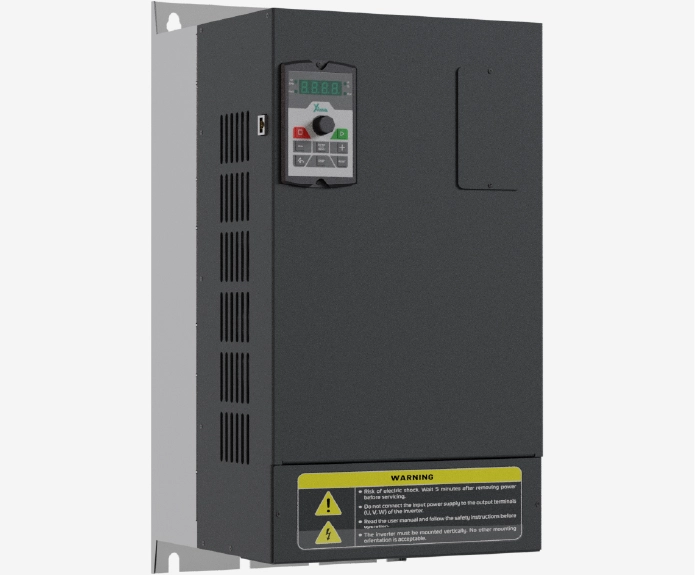
اینورتر 37 کیلووات سه فاز سری سولار پمپ
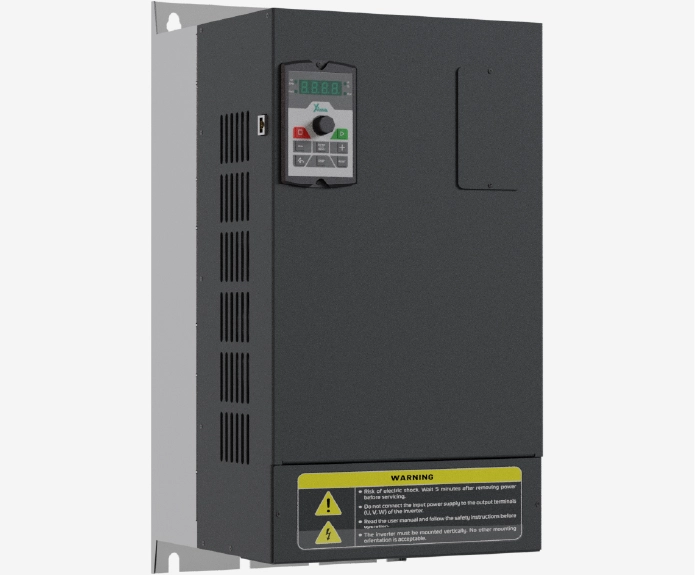
اینورتر 55 کیلووات سه فاز سری صنعتی
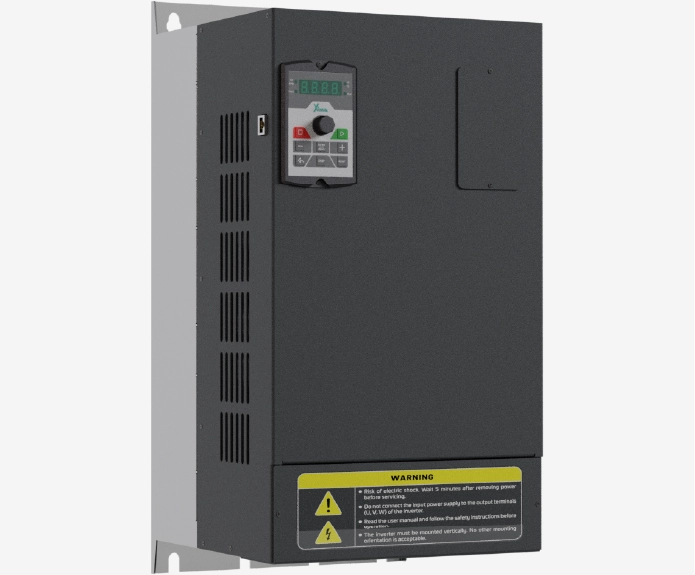
اینورتر 45 کیلووات سه فاز سری صنعتی
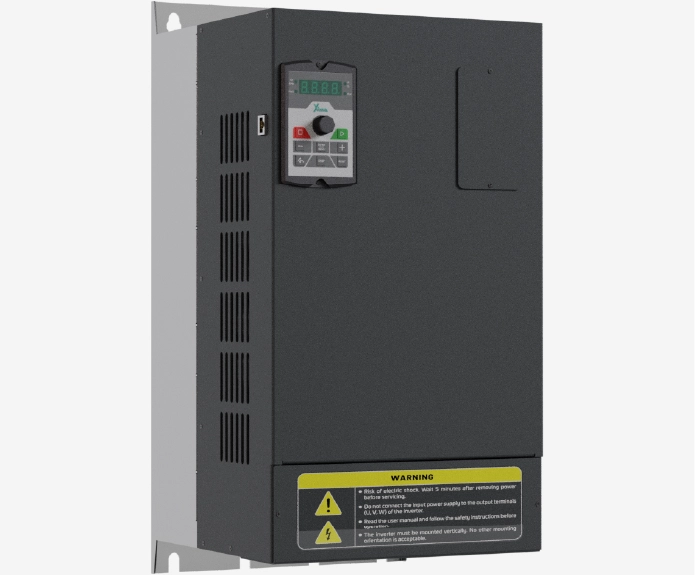
اینورتر 37 کیلووات سه فاز سری صنعتی
اینورتر 30 کیلووات سه فاز سری سولار پمپ
نظرات کاربران
دیدگاهها
هنوز دیدگاهی ثبت نشده است.